
4WD Omni-Directional Arduino Compatible Mobile Robot Kit
Description
- 4 Wheels drive
- Easy to assemble
- Aluminum alloy frame
- Speed: 0.6m/s
- Moves in any direction without turning the orientation
- Comes assembled with only wheels not attached
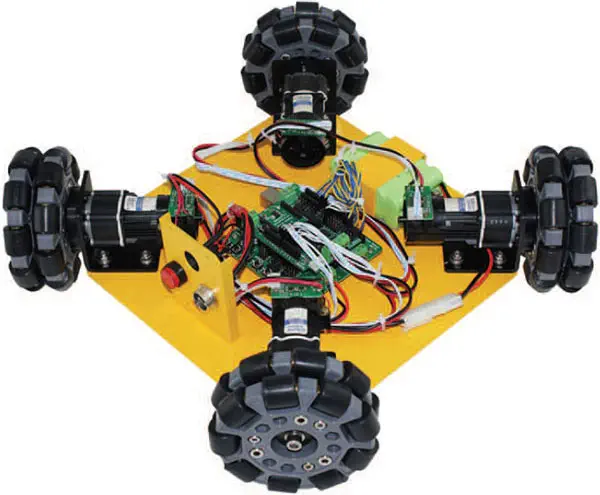
Nexus Robot introduces the 4WD Omni-Directional Arduino Compatible Mobile Robot Kit. It includes microcontroller, IO expansion, DC motor with encoder and by varying the speed and direction of each wheel it can move in any direction without turning its orientation. It is a learning kit for you to learn and enjoy the fun of omni direction moving.
Omni-directional wheels are unique as they are able to roll freely in two directions. It can either roll like a normal wheel or roll laterally using the wheels along its circumstances. Omni-direction wheels allow a robot to convert from a non-holonomic to a holonomic robot. A non-holonomic robot that uses normal wheels has only 2 out of 3 controllable degrees of freedom which are - moving forwards/backwards and rotation. Not being able to move side ways makes a robot slower and less efficient in reaching its given goal. The holonomicomni-directional wheels are able to overcome this problem, as it is a highly maneuverable. Unlike normal non-holonomic robot, the holonomic omni-directional robot can move in an arbitrary direction continuously without changing the direction of the wheels. It can move back and forth, slideways and rotates at the same position.
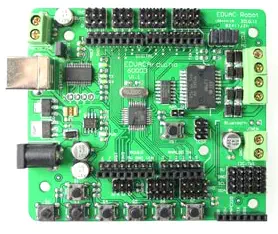
Arduino 328 microcontroller board
It is a microcontroller board based on the Arduino 168. It has 14 digital input/output pins (of which 6 can be used as PWM outputs), 8 analog inputs, a 16 MHz crystal oscillator, a USB connection, a power jack, an ICSP header, and a reset button. It contains everything needed to support the microcontroller; simply connect it to a computer with a USB cable or power it with a AC-to-DC adapter or battery to get started.
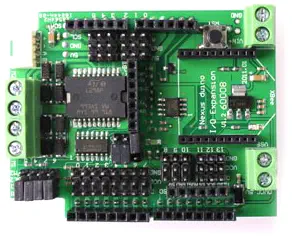
Arduino IO Expansion
Nexus Robot provides the ultimate functional expansion for Arduino IO Expansion V1.2 and gives you extra ease to connect device such as sensors, servo and RS485 device. This sensor expansion board is able to easily connect a number of commonly used sensors.
- 100mm omni wheel X 4
- DC motor with encoder X 4
- Microcontroller X 1
- IO expansion board X 1
Chassis:
- Appearance: Square
- Max width: 402mm
- Height: 100mm
- Chassis height: 21mm
- Wheel base: 260mm
- Coupled mode: Compaction
- Material: Aluminium Alloy
- Color: Yellow, Black
- Speed: 0.6m/s
- Drive Mode: 4 wheel drive
- Climbing capacity: 20 degree
- Load capacity: 10kg
- PC104 compatible: Yes
Wheel:
- Type: 90 degree Omni Wheel
- Diameter: 100mm or 123mm
- Thickness: 38mm
- Material: Polyurethane
- Load capacity: 20kg
- Diameter of Roller: 19mm
- Length of Roller: 19mm
- Coupled Mode: Brass Tube or bearings
This product arrive in a week and it is in excelent conditions
Important hint: For writing a hex file to the robot in USB serial mode the bridge connector RS 485 on the extension shield has to be removed. See also: https://translate.google.com/translate?hl=de&sl=auto&tl=de&u=https%3A%2F%2Fwww.vstone.co.jp%2Fproducts%2Fnexusrobot%2Fqa.html If this is not done, following error occurs: avrdude: stk500_recv(): programmer is not responding avrdude: stk500_getsync() attempt 1 of 10: not in sync: resp=0x18 The correct call than to write is: avrdude -v -v -v -v -CD:"\Program Files (x86)\Arduino\hardware\tools\avr/etc/avrdude.conf" -v -patmega328p -carduino -PCOM3 -b57600 -D -Uflash:w:C:\Test.hex:i Beside that the robot works as expected.
Company I work for purchased four of these for the showcase. Robot is good quality and works fine. However, there are no spare pins left to extend this project. OOTB you can use only serial pins for other communications. No pins left for additional sensors. So if you want to add other components you need to use multiplexer to off load drive direction pins and free I2C pins.
Estimate shipping
Refund Policy
If you are not satisfied with a product purchased from the Site, you may request a return within 30 days from the delivery date, unless the product is listed under the Return Exceptions below or is subject to specific return conditions noted on the product page.
This return policy also applies, as a minimum standard, to products sold and fulfilled by third-party vendors through the Marketplace.
Please review the Return Conditions, Return Exceptions and the process on How to Request a Return Authorisation (RA) before initiating a return request.
United Kingdom consumers exercising their statutory Right of Cancellation are subject to different conditions. See the Statutory Right of Cancellation.
Returns under this policy concern non-defective products. In the case of a confirmed manufacturing defect, remedies are handled under the Warranty terms, at the Vendor's discretion. See the Warranty section.
Return Conditions
To qualify for a refund under the 30-day return policy, all of the following conditions must be met:
- A valid Return Authorisation (RA) number must be obtained prior to returning the product. Returns without an RA number will be refused.
- The RA number is valid for 30 days. The returned item must be received within that period.
- The RA number must be included with the return.
- Products must be returned in unused, unmodified condition (e.g., no scratches, alterations, missing parts, or signs of installation/use) and in their original packaging, suitable for resale.
- Shipping fees are non-refundable. Return shipping costs are the responsibility of the customer, except in cases of a product confirmed defective through RobotShop's troubleshooting process or of a verified shipping error by RobotShop.
- Refunds are processed within 7 days after receipt and inspection of the returned item.
- A £100 cleaning fee may apply to domestic robots returned in used or unclean condition.
- A 20% restocking fee may apply to large-quantity returns of items ordered specifically for the customer from the manufacturer or not part of RobotShop's standard inventory.
Return Exceptions
The following products are not eligible for return or refund under this policy:
- Used, damaged, or modified products — Items that show signs of use, wear, or alteration, making them unsuitable for resale.
- Consumables * — Use and wear-and-tear components, altered or depleted through use (e.g., batteries, belts, brushes, gears, filament, tyres, disposable bags, lubricants, greases, waxes, etc.). Not eligible for return once opened or used.
- Perishables — Goods liable to deteriorate or expire rapidly. Not eligible for return.
- Sealed goods (health or hygiene) — Items sealed for health-protection or hygiene reasons (e.g., masks, gloves, odour-absorbing products). Not eligible for return once unsealed.
- Build-it-yourself products and items requiring customer assembly * — Including robots & kits, robot parts, and other products requiring assembly or soldering. Not eligible for return once assembled, soldered, or installed.
- Digital Goods, Software, and Apps * — Final sale only, due to licensing restrictions.
- Clearance Items * — Products identified as clearance or final sale, including end-of-life or discontinued items.
- Custom-made, personalized, or special-order items — Products manufactured, configured, adapted, or built to the customer's own specifications and requirements.
- On-Demand Items * — Standard catalogue products not stocked by RobotShop and ordered specifically to fulfil a customer request.
- Professional & Specialized Equipment — See the Professional & Specialized Equipment Warranty page and Professional & Institutional Buyers (B2B) section in the Terms & Conditions.
* United-Kingdom consumers retain their statutory Right of Cancellation on these items. Its exercise is subject to the conditions and exclusions set out in the Statutory Right of Cancellation, and any reimbursement may be reduced to reflect a loss in value resulting from handling beyond inspection.
How to Request a Return Authorisation (RA)
While the same return policy applies, these orders require a separate contact process for returns.
- RobotShop Fulfilled Orders → submit a support ticket from your account under My Support Tickets.
- Marketplace Vendor Orders → submit a ticket from your account under My Marketplace Tickets to contact the vendor directly.
Note: Marketplace vendor products are normally labelled with SKUs starting with RM, and identified on the product page with the mention "Sold and fulfilled by [Vendor Name]".