
Artie Max Coding & Drawing Robot
Description
- Artie Max Coding & Drawing Robot
- Comes with three onboard washable markers
- Learn to code in 5 coding languages
- Children programme their design on Artie Max’s UI
- Age: 8+
- Easy to get started with coding and STEM learning
- Built-in rechargeable battery and micro USB data cable
The Artie Max Coding & Drawing Robot brings coding and STEM learning to life by converting the code programmed in the simple user interface (UI) into real line drawings in up to 3 different colours. Kids learn to code in 5 coding languages - Blockly, Snap, JavaScript, Python, and C++ - through fun, creative activities. Artie Max’s colour-changing LED light-up eyes to add extra cool fun to coding for kids.
It’s easy to get started with coding and STEM learning with Artie Max. First-timers can use Artie Max’s Remote Control mode to draw. Beginners can use the drag-and-drop coding options, Blockly, Snap or Artie Max’s own UI. Young coders also have the choice of the text-based programming languages JavaScript, Python, and C++.
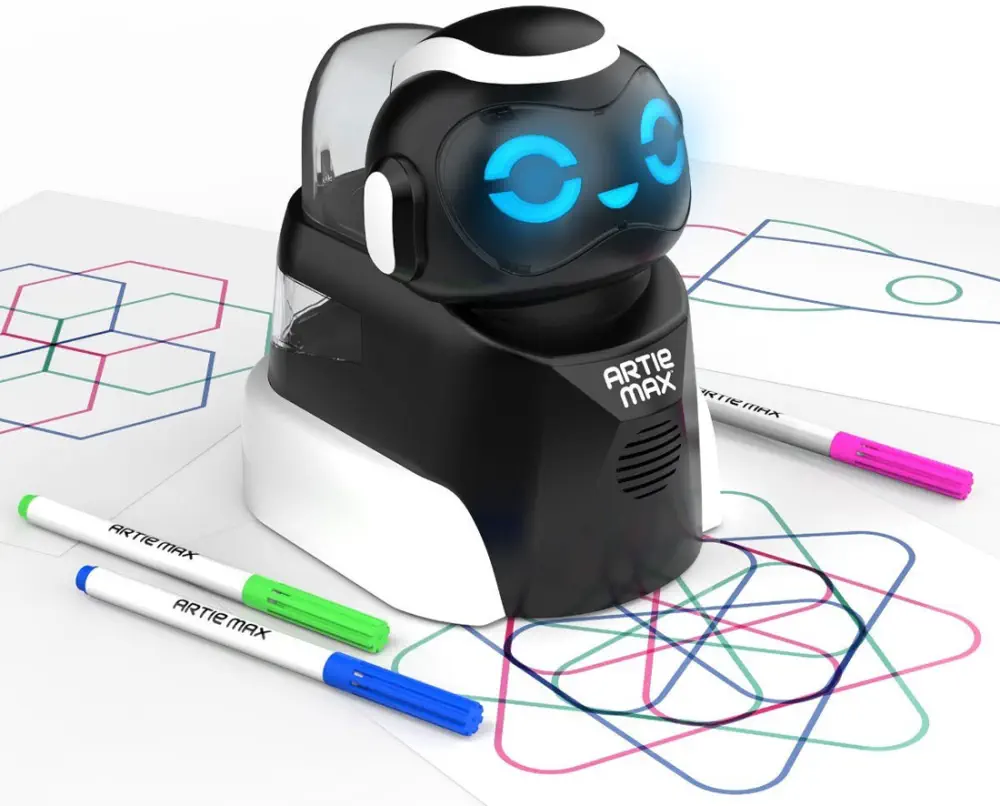
Children programme their design on Artie Max’s UI, set Artie Max on a sheet of A4 paper, and press Run to see Artie Max draw. A simulation mode is available to preview designs and debug if needed. Artie Max comes with 3 onboard washable markers (blue, green, and pink) and works with any markers that are 8mm-10.5mm in diameter.

Artie Max also has cool LED light-up eyes and mouth which can be programmed to change colour. Children can add commands to change their facial expressions and put on a light show. Charging is easy as Artie Max has a built-in rechargeable battery and micro USB data cable.
- 1x Artie Max Coding & Drawing Robot
- 17.5 x 17 cm (H x W)
- Ages: 8+
- STEM learning: Yes
- Markers: Blue, Green, and Pink
- Language: Blockly, Snap, JavaScript, Python, and C++
Estimate shipping
Refund Policy
If you are not satisfied with a product purchased from the Site, you may request a return within 30 days from the delivery date, unless the product is listed under the Return Exceptions below or is subject to specific return conditions noted on the product page.
This return policy also applies, as a minimum standard, to products sold and fulfilled by third-party vendors through the Marketplace.
Please review the Return Conditions, Return Exceptions and the process on How to Request a Return Authorisation (RA) before initiating a return request.
United Kingdom consumers exercising their statutory Right of Cancellation are subject to different conditions. See the Statutory Right of Cancellation.
Returns under this policy concern non-defective products. In the case of a confirmed manufacturing defect, remedies are handled under the Warranty terms, at the Vendor's discretion. See the Warranty section.
Return Conditions
To qualify for a refund under the 30-day return policy, all of the following conditions must be met:
- A valid Return Authorisation (RA) number must be obtained prior to returning the product. Returns without an RA number will be refused.
- The RA number is valid for 30 days. The returned item must be received within that period.
- The RA number must be included with the return.
- Products must be returned in unused, unmodified condition (e.g., no scratches, alterations, missing parts, or signs of installation/use) and in their original packaging, suitable for resale.
- Shipping fees are non-refundable. Return shipping costs are the responsibility of the customer, except in cases of a product confirmed defective through RobotShop's troubleshooting process or of a verified shipping error by RobotShop.
- Refunds are processed within 7 days after receipt and inspection of the returned item.
- A £100 cleaning fee may apply to domestic robots returned in used or unclean condition.
- A 20% restocking fee may apply to large-quantity returns of items ordered specifically for the customer from the manufacturer or not part of RobotShop's standard inventory.
Return Exceptions
The following products are not eligible for return or refund under this policy:
- Used, damaged, or modified products — Items that show signs of use, wear, or alteration, making them unsuitable for resale.
- Consumables * — Use and wear-and-tear components, altered or depleted through use (e.g., batteries, belts, brushes, gears, filament, tyres, disposable bags, lubricants, greases, waxes, etc.). Not eligible for return once opened or used.
- Perishables — Goods liable to deteriorate or expire rapidly. Not eligible for return.
- Sealed goods (health or hygiene) — Items sealed for health-protection or hygiene reasons (e.g., masks, gloves, odour-absorbing products). Not eligible for return once unsealed.
- Build-it-yourself products and items requiring customer assembly * — Including robots & kits, robot parts, and other products requiring assembly or soldering. Not eligible for return once assembled, soldered, or installed.
- Digital Goods, Software, and Apps * — Final sale only, due to licensing restrictions.
- Clearance Items * — Products identified as clearance or final sale, including end-of-life or discontinued items.
- Custom-made, personalized, or special-order items — Products manufactured, configured, adapted, or built to the customer's own specifications and requirements.
- On-Demand Items * — Standard catalogue products not stocked by RobotShop and ordered specifically to fulfil a customer request.
- Professional & Specialized Equipment — See the Professional & Specialized Equipment Warranty page and Professional & Institutional Buyers (B2B) section in the Terms & Conditions.
* United-Kingdom consumers retain their statutory Right of Cancellation on these items. Its exercise is subject to the conditions and exclusions set out in the Statutory Right of Cancellation, and any reimbursement may be reduced to reflect a loss in value resulting from handling beyond inspection.
How to Request a Return Authorisation (RA)
While the same return policy applies, these orders require a separate contact process for returns.
- RobotShop Fulfilled Orders → submit a support ticket from your account under My Support Tickets.
- Marketplace Vendor Orders → submit a ticket from your account under My Marketplace Tickets to contact the vendor directly.
Note: Marketplace vendor products are normally labelled with SKUs starting with RM, and identified on the product page with the mention "Sold and fulfilled by [Vendor Name]".